Intellij IDEA and Go plugin
Install IDEA community edition
Go to Jetbrain download page and install latest free community edition. As of time of this writing the latest IDEA version was 12.Grab IDEA sources!
Get Intellij IDEA community sources
# repo is ~ 1gb, this may take a while git clone git://git.jetbrains.org/idea/community.git idea cd idea # figure out what IDEA build you've just installed cat /Applications/IntelliJ\ IDEA\ 12.app/build.txt; echo -e "\r\n"; IC-129.713 # checkout specified tag in the source repo git checkout idea/129.713 # run ant to build everything ant Depending on the machine this may take 10-20min to compile. Grab Go plugin sources
git clone https://github.com/mtoader/google-go-lang-idea-plugin.git cd google-go-land-idea-plugin/ # compile plugin ANT_OPTS=-Xmx1g ant -Didea.community.build=/Users/bananos/Projects/idea/ -f build-package.xml Buildfile: /Users/bananos/Projects/google-go-lang-idea-plugin/build-package.xml clean: init: [mkdir] Created dir: /Users/bananos/Projects/google-go-lang-idea-plugin/build [mkdir] Created dir: /Users/bananos/Projects/google-go-lang-idea-plugin/dist [echo] Using IDEA build from: /Users/bananos/Projects/idea/ compile: [javac2] Compiling 561 source files to /Users/bananos/Projects/google-go-lang-idea-plugin/build ........................ ........................ package: [jar] Building jar: /Users/bananos/Projects/google-go-lang-idea-plugin/dist/ro.redeul.google.go.jar BUILD SUCCESSFUL Total time: 23 seconds Make sure you specify correct idea.community.build variable which should point to recently checked out IDEA community repo. Unless you struggled with some critical errors, expect to find *.jar files: ls -l dist/ total 1904 -rw-r--r-- 1 bananos staff 974789 Aug 21 15:55 ro.redeul.google.go.jar This is a binary distribution we were looking for! Install plugin
Run IDEA, and go toPreferences->Plugins and click Install plugin from disk button, then select ro.redeul.google.go.jar file from the previous step. 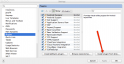
Install Go SDK
Assuming that you’ve installed Go via brew, your Go SDK will be in/usr/local/Cellar/go/1.1.1/ Go to the File -> Project Structure and configure Go SDK by clicking + button and selecting /usr/local/Cellar/go/1.1.1/ folder.  Make sure to add your project
 pkg folder under Classpath and your project sources under Sourcepath tabs. TL;DR
For lazy ones, here is a link to compiled binary!Page 2 of 2 | Previous page